FAQ
Does the app phone home?
No. There is zero telemetry. The only network endpoint ever
contacted is huggingface.co, and only when you explicitly download
a model via the Model Manager. Toggle Settings → Offline mode to
disable that too.
Where does my data go?
Nowhere. The substitution map, decisions log, and intermediate artifacts all live in your project's output directory. Nothing leaves the machine.
Why is the shipped default preset a 4 B Q4_K_M on CPU?
It's the smallest GGUF in the curated catalog that still hits Quality 78/100 on the 5-PDF bench corpus (BENCHMARKS.md) — a Claude-Opus reasoning distill of Qwen 3.5 4B, ~2.5 GB on disk, fits in 8 GB of free RAM, no GPU required. The first-run wizard auto-upgrades to a BF16 preset when it detects ≥19 GB VRAM (quality 83) or to a Q5 reasoning preset at ≥10 GB VRAM. The full preset gallery is reachable any time from the Server panel and every GGUF in the catalog is editable / clonable.
Can I use cloud LLMs (OpenAI / Claude / Gemini)?
Not currently, the project is local-first by design. There's an opt-in "cloud LLM fallback" item on the roadmap, but it will always default to off.
My PDF still shows the original placeholder after Apply
Three usual suspects:
- The map didn't get the new entry. Check the Review tree's "in map" rows, the value should be there with the new placeholder. If not, click Promote approved → map.
- Build hasn't run yet. Promote pauses for review; the
actual
apply / build / verifyonly runs when you click Build on the Build-preview tab. Approve the pending rows, then jump to Build preview and click Build. - Cache hit on the diff preview.
<tmp>/anondiff/preview/keys on(file mtime, rules), if both are unchanged it returns the cached output. Delete the cache directory (the path is$TMPDIR/anondiff/preview/, typically/tmp/anondiff/preview/on Linux).
How do I share a substitution map across projects?
Copy <output_dir_A>/substitution_map.yml into
<output_dir_B>/substitution_map.yml before opening project B in
the GUI. The Review tree will load the entries as ✓ in-map rows
immediately.
How do I reset everything for one project?
Pipeline view → Reset run state. Removes:
auto_promoted_t0.yml/auto_promoted_t1.ymlneeds_review.ymldecisions_history.jsonl(⚠️ kills stable-index history!)applied_substitutions.jsonverifier_report.md
The substitution map is preserved.
Why does the same phone number get the same placeholder across runs?
That's the decisions_history.jsonl doing its job. It stores a
stable-index mapping per Tier-0 rule, so +393331111111 always
becomes +393330000001 no matter how many times you re-scan. Deleting
the file resets the index counter to zero.
Can I edit value (the from-side) on existing rows?
Yes. Double-click the Value column on any row (✓ map / ✓ auto / · pending) and type the new value. The change persists immediately:
- Map rows → rewritten in
substitution_map.ymlwith the samemapping_id. - Auto rows → rewritten in
auto_promoted_t{0,1}.ymland the candidate is flaggeduser_edited=Trueso the next scan won't clobber the rename. - Pending rows → in-memory until the next Promote, then merged.
What if my input file is bigger than the context window?
Doesn't matter. The detector slices each segment into ~5 000-char
chunks via the Markdown-aware splitter
(anonymize/structure_chunker.py).
Each chunk is one independent LLM request. The context window only
needs to fit one chunk + the system prompt + few-shot examples
(typically ~5 800 tokens).
The Run button does a pre-flight check via
anonymize/budget.py and refuses to
launch if the active preset's slot is too small.
Why is the Run button disabled?
Hover for the tooltip, possible reasons:
- No project open.
- llama-server is offline (start it from the Server view).
- Pipeline is already busy.
- The active preset's slot budget can't fit a chunk.
- A previous stage paused for review (
Approve & continuefirst).
How do I run without a GPU?
You don't have to do anything: the shipped default preset is
already CPU-only, it points at the Jackrong Claude-Opus
reasoning distill of Qwen 3.5 4B in Q4_K_M (~2.5 GB download,
n_gpu_layers: 0). It's the smallest GGUF in the catalog that
still hits Quality 78/100 on the bench corpus. Expect ~10× slower
wall time on CPU vs a GPU run.
How do I add a custom format adapter?
Subclass FormatAdapter from
anonymize/format_adapters/base.py
and register it in format_adapters/__init__.py:get_adapter. The
plugin API is on the roadmap but the
internal interface is stable enough to drop in custom adapters today.
Can I use this for HIPAA / GDPR compliance?
The tool can help, but compliance is not a tool, it requires
process, audit logs, and human review. The pipeline emits a
run_manifest.json and applied_substitutions.json you can keep
for auditing. Always have a security professional sign off before
using anonymized output in regulated contexts.
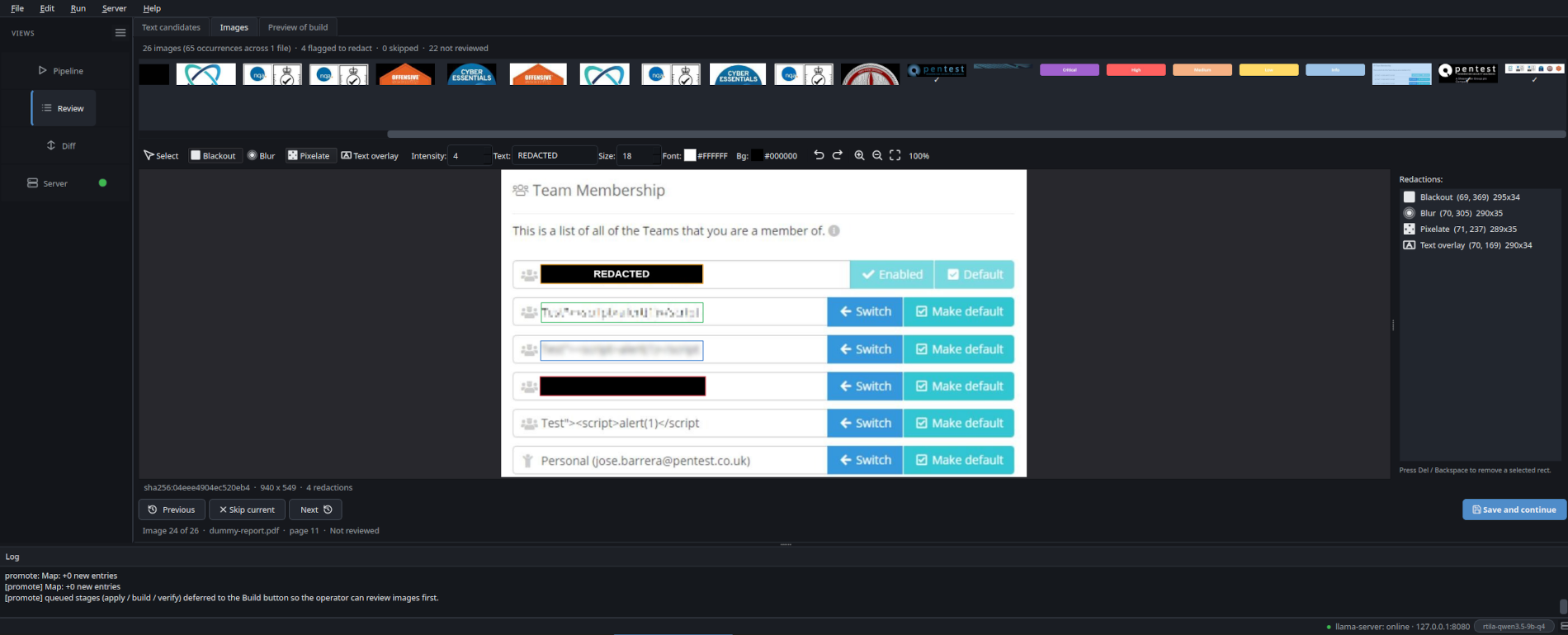
Can I redact embedded images?
Yes. PDF / DOCX / PPTX inputs surface every embedded image in the
Review » Images tab as a thumbnail. Open the editor and
paint blackout / blur / pixelate / text-overlay rectangles. The
canvas re-bakes the actual pixels as you draw (not a translucent
placeholder), and the toolbar exposes a font / background colour
picker for the text overlay. The same image_id (sha256 of the raw
bytes) across pages = single decision applied to every occurrence;
the output keeps the original xref / shape position so layout is
byte-faithful.
Can I select text in the PDF preview?
Yes, in the Preview of build tab (and in the live preview of the Text candidates tab too). The preview pane uses Chromium's built-in PDF.js viewer, so you get native drag-select, Ctrl+C, search, page navigation. Highlights are baked as PDF annotations on a temp copy of the file before being shown, so selection still works on top of them.
How do I add a value to the substitution map without typing it?
Drag-select the value in any preview pane (PDF, Office, HTML,
Markdown, Spreadsheet, plaintext) — or just right-click on a word
— and choose Add "<text>" to substitution map (XXXX) in
the context menu. Adds an entry under category other with
placeholder XXXX; preview re-renders with the new mapping
highlighted in a few hundred ms (debounced). Re-edit the
placeholder later from the Review tree if you want a different
value. When nothing is selected the menu still offers
Add to substitution map manually… for typing the value in.
What's the "Preview of build" tab?
The third Review tab. It runs the format adapter against your current text + image decisions, materialises a temp copy of the output, and shows it in PDF.js. Click Build to commit (runs apply / build / verify on disk); use the Back buttons to bounce back to Text or Images for tweaks.
Can the server start automatically when the GUI opens?
Yes, toggle Auto-start server on launch in the Server panel.
The preference lives in app_settings.yml under the user-config
root (~/.config/document-anonymizer/ on Linux,
%APPDATA%\report-anonymizer\ on Windows,
~/Library/Application Support/report-anonymizer/ on macOS).
Pre-flight check
runs first; the auto-start is silent and skipped if the active
preset can't possibly start (no binary, no model on disk, etc.) so
you don't get a startup-time error dialog.
What's the colored dot next to "Server" in the sidebar?
Live connection indicator: red = offline, amber = starting, green = online. Click it for a one-shot start of the active preset (with a pre-flight check that surfaces a specific error dialog if the config is broken: missing binary, model not on disk, docker not in PATH, external server unreachable). When the server is already up or starting, the click just opens the Server tab.
Why does Promote pause even when nothing seems pending?
The approval gate after Scan always pauses, even when zero candidates were found — a human-in-the-loop guarantee that holds across the whole pipeline. Click Approve & continue when you've confirmed the existing map is what you want. The flow from there is explicit: Promote → Images → Build preview → Build click, which is the only "commit to disk" action.